Meshcore Repeater Coordination
The mesh network in Roanoke has grown quickly in recent months, but some areas still need repeaters to help with coverage. Please avoid installing a repeater in areas where coverage is already good because too many repeaters will reduce available airtime and cause packet collisions.
If you need to add a repeater to the network, please review the following information so we can coordinate our repeater settings, especially the section about coordinating regions.
If you install a repeater, please check in to the discord channel from time to time... It may be necessary to contact you about settings or malfunctions in the future.
Local Repeater Settings
Please contact us if there are questions or corrections.
The sections below are the same sections you see in the meshcore app when configuring a repeater.
Public Info
Name: Please name your repeater after the mountain, neighborhood, or nearby landmark where it is located.
Radio Settings
| Setting | Value | Note |
|---|---|---|
| Frequency | 910.525 Mhz | (default) |
| Bandwidth | 62.5 kHz | (default) |
| Spreading Factor | 7 | (default) |
| Coding Rate | 5 or 8 | Default is 5, use 8 to improve noise tolerance * |
*Several other mesh networks recommend setting the coding rate to 8 for repeaters. I have noticed a slightly improved success rate when using CR8 in some situations.
Owner Info
Enter contact info, such an email address or call sign. This will be visible to guest logins.
Advert Intervals
| Setting | Value | Note |
|---|---|---|
| Auto-Advert (Zero Hop) | 62 | helpful to track RSSI during weather |
| Auto-Advert (Flood) | 71 | 24 hours minimum* |
*Flooded Auto-adverts are detrimental to large mesh networks, please use as few as possible.
Position
Use the map to set exact or nearby position. This will help other operators determine where new repeaters are needed.
Guest Password
Keep the default password blank. This allows guests to lookup owner info and neighbors from the repeater.
Regions
If you are installing a repeater in the Roanoke County area, please install these regions in your repeater. This will allow you to also repeat messages scoped to these regions. Without these installed, you will only repeat unscoped messages. See this for some background on regions.
NOTE: Adding regions to a repeater will NOT block any incoming messages.
US Regions
Every repeater in the state of Virginia should install ALL of these regions.
| Region | Notes |
|---|---|
| us | Anywhere in the US |
| us-east | Eastern US |
| us-southeast | Southern AND Eastern US |
| us-south | Southern US |
| us-va | State of VA |
Virginia State Regions
Also Install ONE of these regions if your repeater is in this location.
| Region | Notes |
|---|---|
| us-va-sw | Southwest VA, south and west of Lynchburg* |
| us-va-cva | Central Virginia, between Lynchburg and Richmond* |
South-West Virginia Regions
Also Install ONE of these regions if your repeater is in this location. DO NOT install these on mountain-top repeaters.
| Region | Notes |
|---|---|
| us-va-roa | Roanoke County VA area only, no mountain tops.* |
| us-va-nrv | VA New River Valley area only, no mountain tops.* |
| us-va-cov | Covington area only, no mountain tops.* |
| us-va-fra | Franklin county VA area only, no mountain tops.* |
*It is important to only install regions assigned to your location. Avoid trying to 'extend' a smaller region outside of its assigned location, small regions need to stay small to keep the mesh working efficiently. Instead of extending a small region, use one of the larger regions for your channel. For example, channel #roanokeva should use the us-va-sw region.
Local Regions
ONLY Install ONE of these regions if your repeater is in this location. DO NOT install these on mountain-top repeaters.
| Region | Notes |
|---|---|
| us-va-nrv-psk | Pulaski County Region, no mountain tops * |
*It is important to only install regions assigned to your location. Avoid trying to 'extend' a smaller region outside of its assigned location, small regions need to stay small to keep the mesh working efficiently. Instead of extending a small region, use one of the larger regions for your channel. For example, channel #roanokeva should use the us-va-sw region.
Install Regions
Using the GUI
NOTE: If your repeater is using a recent firmware (1.16 or newer), it is much easier using the CLI method in the next section.
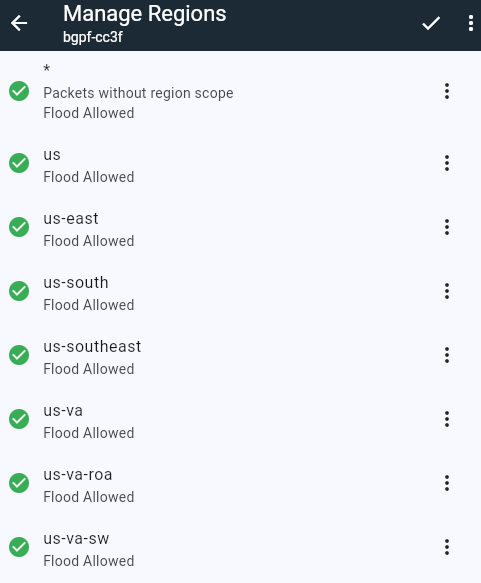
Regions can be added using repeater management under settings->manage regions. Select the regions for your area from the section above, and add them all with flood enabled. After adding all the regions, BE SURE TO CLICK SAVE. Your screen should look similar to this:
Using the CLI
When configuring the repeater, copy these lines using the copy button on the right, then paste them into the 'Command Line' tab on your repeater:
If you are outside Roanoke, replace the last region in the list with your region.
Don't forget to save!
After entering regions, or typing 'regions' on the CLI tab, you should see something like this:
NOTE: If you need to delete regions, its easier to do that from the settings->manage regions page. Delete them from the bottom first.
Read more about regions:
Command Line Reference on Repeater Region Management
Pacific Northwest MeshCore Region Strategy
ripplebiz blog post on region filtering
Command Line Only Options
Some repeater options are only available using the 'Command Line' tab in the meshcore app. Copy each line here and paste into the app, then press enter.
Set tx power to maximum. This setting applies to the radio before any hardware amplifier. NOTE: In some cases your signal will be cleaner and easier to receive if you set the tx power to just under 22, something like 20 or 18.
Set loop detection to strict. This should help prevent packets from looping back and being repeated a second time. Loop detection works best when people use 2-byte or 3-byte routing in their companion.
This improves packet timing randomization so repeaters avoid transmitting simultaneously.
txdelay adds a small random delay before sending. This is important so that repeaters which receive the same packet don't attempt to retransmit at the same time.
rxdelay adds a small delay after receiving a packet based on the signal strength of the packet. Just like txdelay, this helps prevent repeaters which receive the same packet from attempting to retransmit at the same time.
This prevents the radio's automatic-gain control from locking on to the ambient noise.
(this option for high noise environments only)
References:
Repeater command line reference
TennMesh recommended repeater settings
Discussion about rxdelay/txdelay
MeshCore factors in selecting rxdelay txdelay and direct.txdelay